Animal Hospital Map & Layout Guide
The Animal Hospital map explained: the reception desk, all treatment rooms, where threats spawn, and how to move efficiently during emergencies.
Last updated: June 19, 2026
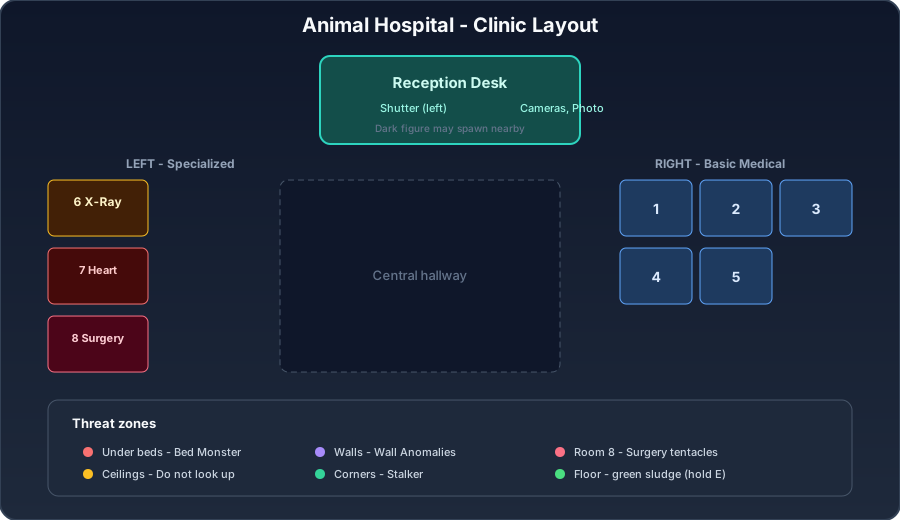
Knowing the hospital layout is what lets you move efficiently when multiple emergencies hit at once. This guide maps out the clinic — the reception desk, the eight treatment rooms, and where the various threats tend to appear — so you always know where to go and what to expect.
The reception desk
The reception desk is your home base and where every shift begins. Here you have:
- The check-in window, where patients arrive one at a time.
- The Shutter button on the left of the desk, which you press to reject Anomalies.
- The CCTV cameras for spotting camera anomalies.
- The photo station for photo anomalies.
- A taser located next to the cameras as your starting weapon.
The desk is also where the dark figure sometimes spawns nearby — when the camera zooms toward it, look away to protect your Sanity.
The treatment rooms
There are eight numbered treatment rooms, and remembering which is which saves precious seconds:
- Rooms 1–5 (on the right) — Basic Medical. The most common treatment: analyze DNA, then administer items.
- Room 6 (on the left) — X-Ray. Copy-the-sequence mini-game, then items.
- Room 7 (on the left) — Heart Monitor. Click white icons, avoid skulls, then items.
- Room 8 (on the left) — Surgery. A timed mini-game you cannot leave once started.
A useful mental model: the right side is your bank of standard Basic Medical rooms, and the left side holds the three specialized rooms in ascending difficulty — X-Ray, Heart Monitor, then Surgery.
Where threats appear
Different enemies favor different parts of the map, and knowing this lets you anticipate them:
- Under the beds in treatment rooms — the Bed Monster. Approach with Maple Syrup to dismiss it.
- On room ceilings — the Don’t Look Up threat. Keep your camera down while you work.
- On walls — Wall Anomalies that chase you, and Wall Bangers that pound on your check-in glass.
- Around corners — the Stalker. Never look directly at it as you pass.
- In Surgery (room 8) — tentacles during the operation. Ignore them and finish.
- On the floor — green sludge/slime, cleared by holding E.
Moving efficiently during chaos
Efficiency comes from minimizing back-and-forth. A few habits help:
- Batch your check-ins. Outside of emergencies, check in all waiting patients at the desk first, then treat them in a sweep so you are not running to the desk between every room.
- Group treatments by side. Knock out the right-side Basic Medical rooms together, then handle the left-side specialized rooms.
- Pre-position for events. When you hear or see an emergency, use the layout to take the shortest path — sprint if needed — because emergencies like fainting patients and the Death Ritual are timed.
Use the map with the rest of the wiki
The layout ties directly into your other skills: the desk is where you run Anomaly detection, the rooms are where you execute treatments, and the spawn points tell you where enemies will test your Sanity. Internalize the geography and the rest of the game gets noticeably calmer. Next, review the Controls so you can move and interact across this map without hesitation.
Frequently asked questions
How many treatment rooms are there?
There are eight numbered treatment rooms. Rooms 1–5 on the right are Basic Medical, room 6 is X-Ray, room 7 is Heart Monitor, and room 8 is Surgery.
Where is the Shutter button?
The Shutter button is on the left side of the reception desk. You press it to reject Anomalies at the check-in window.
Where do threats spawn?
Threats appear all over: Bed Monsters under treatment-room beds, the Don't Look Up threat on room ceilings, Wall Anomalies on walls, the Stalker around corners, and the dark figure near your check-in booth.